
PremierBet has crafted a mobile app for Cameroonian users that brings both local and international sports action directly to their Android phone or tablet. The app stands out with its simple navigation, sharp focus on football, and fast updating odds for live events in Africa and beyond.

Download PremierBet Android Bookmaker App On Your Phone
Operating system
Android 5.0
RAM
1GB
Memory
300 MB
Languages
French, English
PremierBet Welcome Bonus
200% up to 112 000 CFA
and 50 FS
PremierBet operates legally through a local license and forms part of a reliable network trusted across multiple African countries. The expert development team has prioritized a seamless betting experience, making it a top pick for those in Cameroon where Android remains the leading choice among smartphone users.
PremierBet Android Application Design and Interface
The PremierBet app presents a crisp layout that guides users through sports, matches, and account sections without clutter. Green and white take center stage in the color palette, making navigation smooth on the eyes during daytime or nighttime use. The bottom menu bar offers shortcuts to football events, bet slips, and user accounts, while the homepage displays top live and upcoming fixtures. Every element feels well spaced, so first-timers and experienced users both find it intuitive and stress free.
Bonuses Available for PremierBet Android Users
Users of the PremierBet Android app can take part in a range of bonuses designed to enhance their sports adventure. These bonuses boost the excitement, reward frequent engagement, and help new users kickstart their journey. Active campaigns change throughout the year, but the core offerings often include:
- Welcome bonus: Get a matched deposit or free bets as a new PremierBet account holder when you fund your balance for the first time.
- Periodic promotions: Enjoy odds boosts, free bet offers on selected matches, and accumulator boosts.
- Loyalty rewards and special event bonuses: Ongoing promos for regular punters, like cashback or insurance on multi-bets for popular leagues and tournaments.
Currently, no exclusive bonus appears for app download, but the convenient app format keeps users in touch with all latest offers through notifications.
Welcome Bonus
200% up to 112 000 CFA
50 FS
Installation and Registration Guide for PremierBet Android App
Downloading the PremierBet app from the official website remains the safest route, keeping you clear from fake copies or harmful APKs. By following our guide, you always get the verified app straight from PremierBet’s trusted channels. Here is a step-by-step walk-through to help you set up smoothly:
1
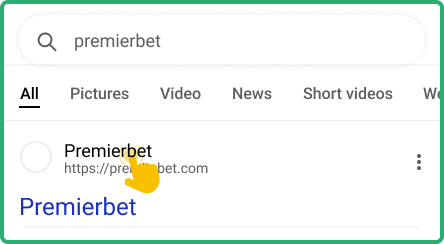
Visit the official PremierBet Cameroon website
Head to PremierBet’s official website using your Android phone or tablet browser and look for the mobile app download section on the main menu.
2
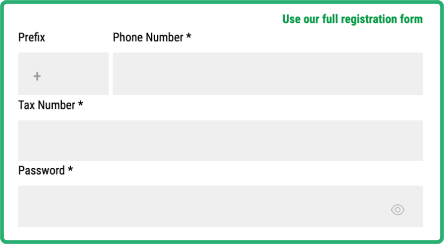
Register or log in to your account
Either sign up as a new user or log in to your existing PremierBet account from the website before proceeding to download.
3
Download the app via Google Play
Click the “Download for Android” button, and you will be redirected to the official Google Play Store page for PremierBet. Tap to install straight from there.  Download PremierBet Android App
Download PremierBet Android App 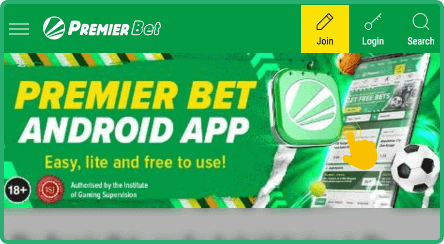
4
Launch and explore the PremierBet app
Once installation has finished, find the app icon on your home screen and start navigating upcoming matches, live events, or your account features.

If for any reason you are unable to download the Android app, the PremierBet mobile version provides a smooth alternative through your Android browser.
How to Log in to Your Account on PremierBet Android App
Logging into PremierBet’s Android app closely echoes the website approach and feels simple once you follow the right process. Secure sign-in helps protect your balance and data, so use our quick steps to get started and avoid any mistakes.
1
Find and launch the PremierBet app
Locate the PremierBet app icon on your phone or tablet, then tap to open the application.
2
Click on the sign in button
Tap the sign-in or log-in button, usually located on the top right of the home screen, which brings up the secure login form.
3
Enter your login credentials
Type your registered username (or mobile number) and password in the required fields, then tap to confirm access.
4
Access your profile and start exploring
Once inside, you can visit your account dashboard, deposit funds, or head to the sports section to start placing bets on your preferred matches.
Those who cannot use the Android app can always access PremierBet’s mobile-friendly website from their device’s browser. For a near-app feel, add a shortcut to your home screen, so you can launch PremierBet with a single tap just like with an app.
PremierBet Android App System Requirements
PremierBet’s development team wanted a betting app that works with a huge number of Android mobile gadgets, even those with modest specs. Check out the requirements below and make sure your phone or tablet meets them for a smooth experience.
| Parameter | Description |
|---|---|
| License | Operates legally in Cameroon, holds local authorization |
| Operating System Version | Android 5.0 or later |
| Free memory space | Needs between 40 MB and 60 MB of free storage |
| RAM | 1 GB RAM recommended for fast performance |
| Deposit and withdrawal methods | Mobile money (MTN MoMo, Orange Money), bank cards, and more |
| Sports betting events available | Wide choice: football (African leagues and international), basketball, tennis, other sports |
| Betting markets and odds | Standard markets: 1X2, over/under, double chance, accumulators, decimal odds, live betting |
| Languages | Available in English and French |
Updating PremierBet Android App to the Latest Version 2026
Using an outdated PremierBet Android app creates a few problems, such as missing features, potential bugs, and weaker data security. Older versions may not work well with the latest Android updates or payment methods. Some updates also respond to changes in local laws, which keeps the app secure and legal. Stay current by following these steps:
- Open the Google Play Store app on your device.
- Tap your profile icon (top right) and select Manage apps & device.
- Tap "Updates available" or "See details".
- Tap "Update all" or just the PremierBet app’s “Update” button.
PremierBet Android Mobile App Main Features
The PremierBet Android app does not fall short compared to desktop or mobile versions, as it retains the same rich feature set for Cameroon users. The team kept the interface lightweight to run well on all Android phones, tablets, and similar gadgets, while packing in live sports coverage, detailed stats, and modern account controls. Push notifications, real-time odds, and a complete bet history keep users engaged right from their mobile devices. Below, each highlight shows how the app stands out in daily use.

Push Notifications
Push notifications deliver instant updates on match results, account activity, and special offers, so users miss nothing. Stay tuned for live odds changes or promotions with these timely alerts. Custom notification preferences let everyone set what they want to receive.

Live Betting and Streaming
PremierBet’s Android app lets fans jump into live betting on football, basketball, and other popular sports. Odds update fast during matches, so making well-timed bets feels easy. Although live video streaming isn’t included, animated match trackers and real-time stats add value.

Face ID Access
The app takes security seriously by supporting biometric logins like Face ID where available. Android phones with fingerprint or face unlock can use this quick access method. Users save time and avoid manual logins while keeping accounts protected.
Customer Support Available for Android Users
PremierBet’s customer support feels close at hand on the Android app, giving users a range of ways to ask questions or solve issues smoothly. The help section provides instant advice, while several direct channels connect you to real support teams.
- Live chat support in the app
- Email support via a provided address
- Customer service phone lines (local numbers)
- FAQ/help section accessible from the app’s menu
Pros and Cons of the PremierBet App for Android
Pros
- Operates legally in Cameroon with solid local credentials
- Interface designed for beginners with smooth navigation
- Wide football coverage for both African and international leagues
- Top-class support for mobile money deposits and withdrawals
- Downloadable from Google Play for easy installation
Cons
- Fewer sports options compared to some international apps
- App does not include casino or live dealer games
- Missing live video streams for matches
- Advanced betting features may seem limited for experts
FAQ
Is PremierBet Android app legal in Cameroon?
PremierBet runs its mobile app under a local license and meets all necessary requirements set by Cameroon’s authorities. This means fans using Android phones and tablets can access the app without worry about legality. PremierBet’s presence in several African countries highlights its regional trust and compliance.
How can I check if my device is compatible with the PremierBet Android application?
To check compatibility, compare your device with the requirements listed earlier in this article. As long as your phone or tablet runs Android 5.0 or higher, has at least 1 GB RAM, and enough free space, you should have smooth access to the PremierBet app. Most modern Android gadgets in Cameroon will meet these specs.
What should I do if the PremierBet Android app does not work?
If the app fails to start or freezes, try restarting your device and checking your internet connection. Make sure the app downloaded from Google Play is current and not an outdated version. If problems persist, reach out to PremierBet’s customer support through live chat or email so they can help resolve technical issues quickly.